How To Run AI Coding Agents Across Machines Without Duplicate Work
More AI coding agents only help when ownership, state, and proof survive outside a single session. This refreshed guide shows how Agiflow uses CLI runners, workflow locks, atomic claims, device identity, and artifacts to coordinate agent work across machines without duplicate branches or lost handoffs.
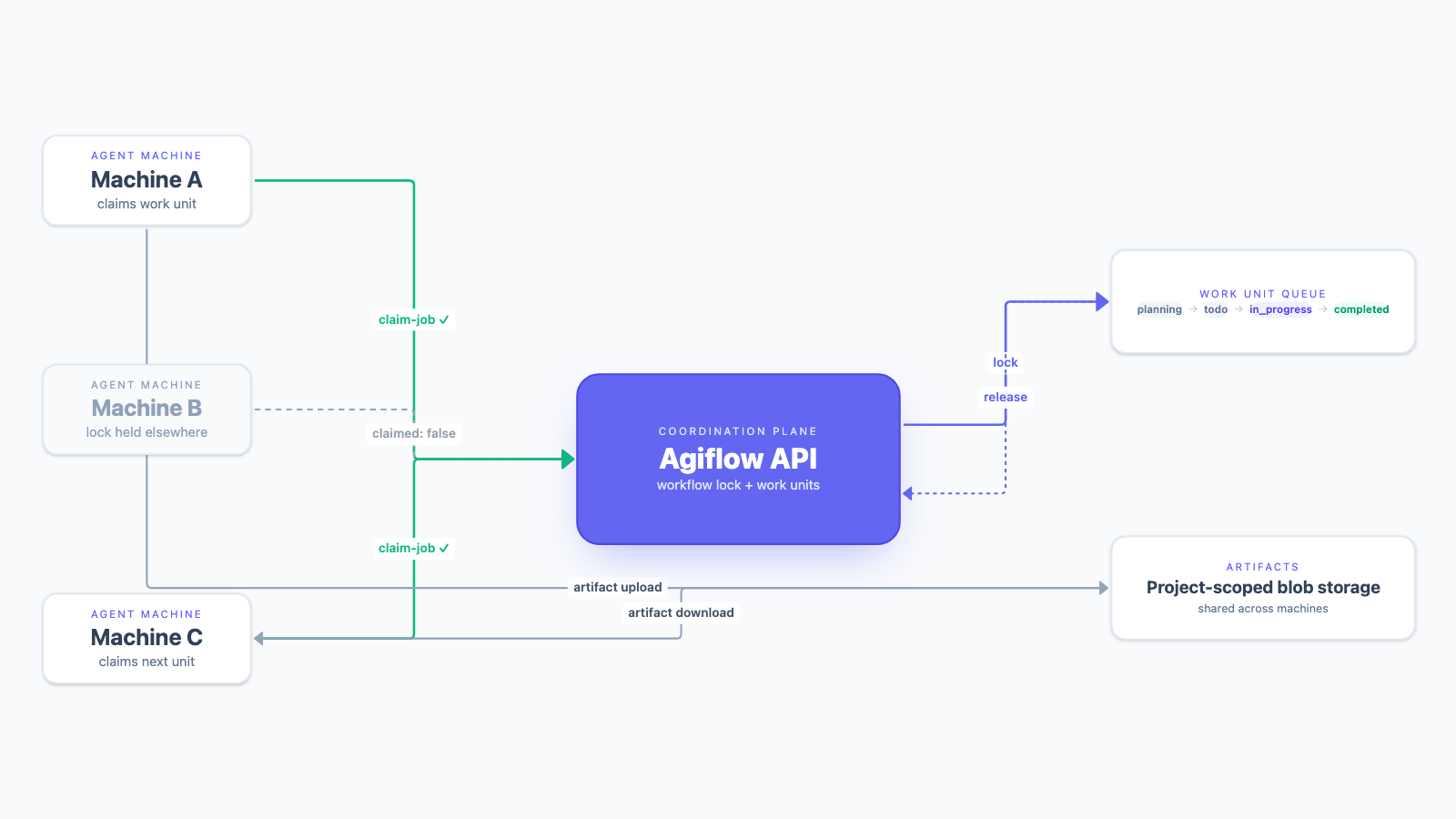
Agiflow CLI gives local runners a shared state, lock, and artifact boundary without making Agiflow the coding agent.
Running one AI coding agent locally is a feedback-loop problem. Running several agents across laptops, workstations, and CI-adjacent boxes is an ownership problem.
We learned that the hard way while building Agiflow with Agiflow. A single local runner felt fast because the agent kept a warm workspace, shell history, generated files, and test state. The second machine made the same design unsafe. Two runners could see the same backlog item, create branches that looked legitimate, and leave a human to reconstruct which branch owned the task.
The fix was not "more CI" or "more worktrees." It was a shared execution contract: project state outside the model context, an atomic claim before work starts, a workflow lock during execution, a stable device id for the machine, artifacts attached to the work, and an explicit release at the end. That contract fits the same mental model as work units for AI coding agents and role-separated agent orchestration: keep each agent's job narrow, but keep the state durable enough that another runner or reviewer can inspect it later.
Quick Answer: How Do You Safely Run AI Coding Agents Across Multiple Machines?
Use a shared project control plane, not laptop-local memory, as the source of execution truth. A safe multi-machine runner loop needs seven pieces:
- A shared backlog record the runner can read.
- An atomic claim that returns "someone else won" as normal data.
- A workflow lock that lives with the work unit or task, not with a local daemon file.
- A stable device id so the team can tell which machine claimed the work.
- A warm local workspace where the agent can iterate quickly.
- Artifacts uploaded back to the project record.
- A release step that marks the run completed or failed.
Agiflow supplies the board state, scoped MCP tools, workflow locks, artifacts, vault entries, and prompt skills for external assistants. It does not replace the assistant, the model, tests, CI, or code review. That boundary matters because MCP write access is powerful. The MCP specification and security guidance both stress user consent, user control, data privacy, scope minimization, and tool risk. OpenAI's developer mode docs make the same point for ChatGPT MCP write tools: write-capable tools are useful, but dangerous when prompt injection, accidental writes, or malicious servers are in play. [6] [7] [8] [15] [16]
Why CI Verifies Agent Work Better Than It Runs The Inner Loop
Our first instinct was to run the agent workflow through GitHub Actions. That was a reasonable place to start. GitHub-hosted runners execute jobs on managed machines, and most jobs use a new hosted virtual machine. GitHub also recommends ephemeral self-hosted runners for autoscaling, with one job assigned to each ephemeral runner. Those properties are good for controlled verification. [1] [2]
They are less good for the agent's inner loop.
A coding agent rarely moves in a clean install -> lint -> test -> done line. A normal run is messier: edit, run a test, inspect the failure, update a migration, regenerate a client, retest one package, inspect logs, change the earlier edit, then run the broader suite. The agent spends much of its value on backward steps.
GitHub Actions dependency caching helps restore setup faster through cache keys, restore keys, and branch scopes. That is useful infrastructure, but it is still job-bound infrastructure. It does not give the agent the same warm TypeScript state, local database, generated files, terminal scrollback, and shell history it has inside a persistent local workspace. [3]
The sharper rule is this: CI should verify finished branches. Local runners should host the hot repair loop.
| Execution surface | Best job | What stays warm | Where it hurts |
|---|---|---|---|
| GitHub Actions | Verify a branch or publish a result | Cacheable dependencies, job artifacts | Each repair loop still crosses job setup and remote execution |
| One local runner | Let one agent iterate on one work unit | Workspace, generated files, local services, shell history | Local state is only true while one machine exists |
| Agiflow CLI runners | Let multiple machines pull from one backlog | Each machine keeps its local workspace, while ownership lives in Agiflow | Runner policy still needs team discipline |
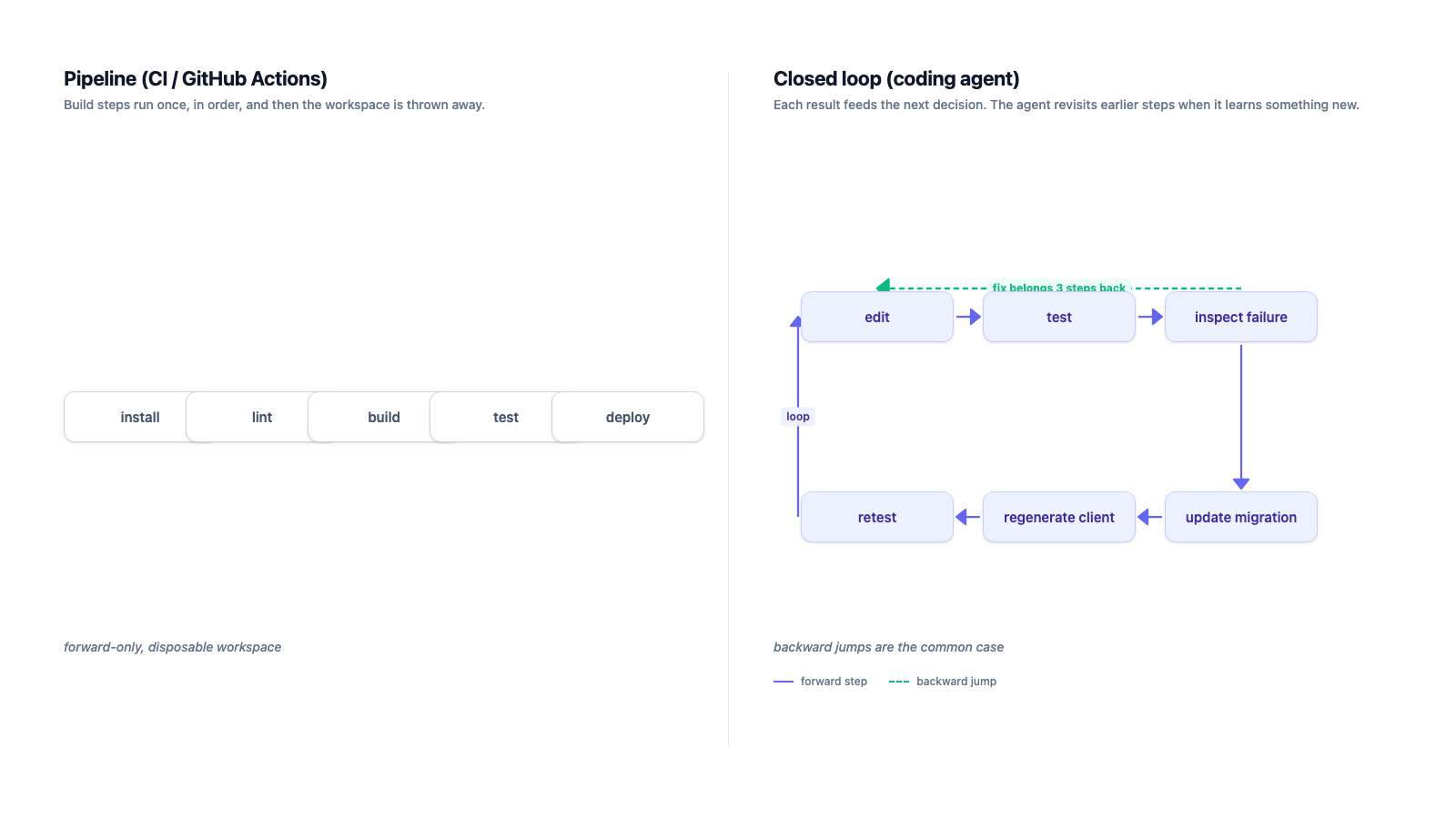
This is not an argument that CI cannot run agents. It can. The point is narrower: a pipeline is designed around controlled jobs, while a coding agent's value often comes from fast local correction.
Why The One-Machine Daemon Failed On The Second Laptop
The first Agiflow runner was simple. It asked the Agiflow backlog for the next work unit, started an agent with the right context, and let that agent iterate locally. On one machine, a local "currently running" record looked true enough.
Then another developer started the same daemon on a second laptop.
Both machines could observe the same work as available. Both could start valid-looking branches. Both could change the same schema, generate different migrations, or make incompatible assumptions about the task boundary. The conflict usually appeared late, when a reviewer had to decide which branch actually represented the work.
Our early fixes were local coordination pretending to be distributed coordination. Claim timestamps helped until a laptop slept. Heartbeats helped until a process died after writing code but before releasing the claim. Expiry windows helped until a long test made a healthy agent look abandoned. Social listening in the research surfaced the same practical complaint from agent users: worktrees and separate checkouts help isolate files, but they do not automatically preserve task ownership, decisions, handoff notes, or review evidence.
That is the durable design lesson. If the backlog is shared, the execution claim has to be shared too.
The Control Plane: Board State, Scoped Tools, And A Thin CLI Gateway
@agiflowai/cli is the thin gateway we use for that execution contract. As of July 5, 2026, the npm page describes a public package for Agiflow projects, tasks, work units, workflow locks, artifacts, automation runners, human terminal mode, and JSON output. [5]
The CLI is intentionally boring. It does not become the agent. It does not invent a second queue. It calls the Agiflow API and gives humans or scripts a stable command surface:
- Human mode for login, inspection, and readable terminal output.
- JSON mode for automation, where
automation,project,task,work-unit,member,task-comment,artifact, andworkflowcommands can be consumed by scripts. - Environment-based scope through values such as
AGIFLOW_PROJECT_ID,AGIFLOW_TASK_ID,AGIFLOW_WORK_UNIT_ID, andAGIFLOW_DEVICE_ID.
That scope model lines up with Agiflow's MCP docs. Agiflow documents organization, project, work-unit, and task scopes. Project scope includes tasks, work units, artifacts, vault entries, and workflows, while the capability reference describes Agiflow as project-board tools and prompt skills for external assistants, not an agent runtime. [15] [16]
For teams comparing this to broader MCP project management tools, the important difference is where live work state lives. The assistant can stay in ChatGPT, Claude, Cursor, Codex, or another compatible client. The project board holds the shared state and guardrails those assistants can use.
Atomic Claims: Losing The Race Should Be Normal Data
In a multi-runner setup, losing a claim is not an error. It is the common case.
PostgreSQL's SKIP LOCKED behavior is a useful general analogy: when multiple consumers touch queue-like rows, a consumer can skip rows it cannot immediately lock to reduce contention. That source does not prove anything about Agiflow's database implementation. It supports the broader queue design principle: contention is expected, so the consumer contract should make contention ordinary. [12]
Agiflow CLI exposes that idea at the runner level. The automation command group is for polling workers. A runner lists jobs, attempts to claim one, and treats claimed: false as normal data when another machine wins.
job=$(agiflow-cli automation list-jobs \
  --project "$AGIFLOW_PROJECT_ID" \
  --status todo,in_progress \
  --limit 1 \
  --format json)

job_id=$(printf '%s' "$job" | jq -r '.items[0].id // empty')
job_kind=$(printf '%s' "$job" | jq -r '.items[0].kind // empty')
[ -n "$job_id" ] || exit 0

claim=$(agiflow-cli automation claim-job \
  --project "$AGIFLOW_PROJECT_ID" \
  --job-kind "$job_kind" \
  --job-id "$job_id" \
  --name "runner-$(hostname)" \
  --device-id "$AGIFLOW_DEVICE_ID" \
  --format json)

claimed=$(printf '%s' "$claim" | jq -r '.claimed // false')
workflow_id=$(printf '%s' "$claim" | jq -r '.workflowId // empty')
[ "$claimed" = "true" ] && [ -n "$workflow_id" ] || exit 0

# Run the coding agent against the claimed work.

agiflow-cli automation release-job \
  --project "$AGIFLOW_PROJECT_ID" \
  --workflow-id "$workflow_id" \
  --status completed \
  --format json
The current CLI help confirms automation list-jobs, claim-job, and release-job use --project, --job-kind, --job-id, --device-id, --workflow-id, --status, and --format options. That matters because runner examples become operational copy, not just prose.
The state machine is small:
| State | Runner sees | Runner does |
|---|---|---|
| Backlog empty | list-jobs returns no item | Sleep or exit |
| Lost the race | claim-job returns claimed: false | Drop it and poll later |
| Claimed | claim-job returns claimed: true and a workflowId | Run the agent, upload evidence, release |
Workflow Locks Versus Git Worktrees
Git worktrees and workflow locks solve different layers.
Git documents worktrees as a way for one repository to support multiple working trees, allowing more than one branch to be checked out at a time. That is genuinely useful for parallel coding agents. Simon Willison has also observed practitioners running multiple coding agents through separate checkouts or worktrees, with review throughput becoming a bottleneck. [13] [14]
But a worktree does not know who owns the task, what a reviewer needs to inspect, which machine should back off, or whether the work is ready for another agent. That state belongs in the project layer.
| Primitive | Owns | Does not own |
|---|---|---|
| Git branch or worktree | File isolation and branch isolation | Task ownership, agent handoff, review evidence |
| Work unit | Feature-level scope and acceptance context | Local filesystem state |
| Task | Executable unit of work | Cross-task feature coherence |
| Workflow lock | Exclusive execution claim | Model quality or implementation correctness |
| Device id | Which machine is running the claim | Whether the agent made the right change |
| Artifact | Evidence produced by the run | Final approval |
| Runner policy | What statuses to poll, retries, capacity, backoff | Shared project truth |
Artifacts Turn Agent Output Into Review Evidence
Locking prevents duplicate execution. Artifacts prevent lost proof.
A branch usually contains code, but it rarely contains everything a reviewer needs: a Playwright trace, a screenshot, a coverage report, a migration diff, a benchmark note, a generated API report, or a structured handoff. GitHub Actions artifacts solve the CI version of this problem by storing output after a workflow completes or sharing data between jobs. [4]
Agiflow artifacts make the same idea project-native. The evidence belongs with the project, work unit, or task record that created it, not as an unlabeled file path on one runner or a Slack link nobody can find a week later. Agiflow's project workflow docs describe projects, work units, tasks, and supporting resources, with project views for board, list, artifacts, and workflows. [17]
agiflow-cli artifact upload ./playwright-report.zip \
  --project "$AGIFLOW_PROJECT_ID" \
  --name playwright-report.zip \
  --type application/zip

agiflow-cli artifact download "$ARTIFACT_KEY" \
  --project "$AGIFLOW_PROJECT_ID" \
  --output ./playwright-report.zip
The useful review question changes from "which laptop has the file?" to "what evidence is attached to this work?" That matters more as more agents join the loop. A backend agent can upload an API report. A frontend agent can pick it up later. A tester can attach screenshots and traces. The reviewer can inspect the same work record without asking the runner to reconstruct yesterday's context.
What Runner Policy Agiflow Intentionally Does Not Own
Agiflow owns coordination primitives. The team still owns runner policy.
That is the right boundary because the policy depends on your codebase, test cost, review culture, and risk tolerance. OpenAI's handoff docs describe handoffs as one agent delegating to another through tools, while the orchestration docs distinguish handoffs from agents-as-tools and advise narrow specialists when contracts change. The general lesson applies here: do not blur the contract between the runner, the assistant, the board, and the reviewer. [9] [10]
Anthropic's context-engineering article is another useful warning. It frames agent context as finite and says useful context includes system instructions, tools, MCP, external data, message history, and evolving state. If that state is scattered across a terminal, a chat, a branch, and a local note, the next agent has to guess which part is current. [11]
For a multi-machine runner, keep these decisions explicit:
- Which statuses are runnable.
- How often a runner polls when the backlog is empty.
- How long a runner retries transient failures.
- Whether failed runs release immediately or wait for human inspection.
- Which artifacts are mandatory before release.
- Which tasks are too risky for unattended execution.
- Which human approval gates remain blocking.
Just as important, write down what the system does not solve. It does not make a weak model reliable. It does not decompose vague work. It does not replace tests, CI verification, code review, or human approval. It only makes ownership and evidence visible enough that those controls can work.
Try It: The Minimal Runner Contract
The CLI is published as @agiflowai/cli. [5]
# One-off, no install
npx @agiflowai/cli --help

# Or install globally
npm install -g @agiflowai/cli
agiflow-cli login
Before putting a runner on more than one machine, copy this contract into the runner script or runbook:
- The runner only polls statuses the team has approved for execution.
- Every machine sets a stable
AGIFLOW_DEVICE_ID. - Every claim uses
automation claim-job, not a local "currently running" file. claimed: falseis treated as a normal race loss, not an alert.- The agent uploads required artifacts before release.
- The runner releases with
completedorfailedon every exit path. - CI remains the verifier for finished branches.
- Humans still own review and approval.
That is the whole point of the Agiflow CLI pattern. The agent loop stays local and fast. The ownership record lives in the shared project state. The evidence travels with the work. More machines can join without making the human reviewer the hidden coordination layer.
References
- GitHub Docs: GitHub-hosted runners .
- GitHub Docs: self-hosted runners reference .
- GitHub Docs: dependency caching reference .
- GitHub Docs: store and share data with workflow artifacts .
- npm: @agiflowai/cli.
- Model Context Protocol specification, 2025-06-18 .
- MCP Security Best Practices .
- OpenAI Developers: ChatGPT developer mode .
- OpenAI Agents SDK: handoffs.
- OpenAI API docs: agents orchestration .
- Anthropic Engineering: Effective context engineering for AI agents .
- PostgreSQL documentation: SELECT locking clause .
- Git documentation: git-worktree.
- Simon Willison: Embracing the parallel coding agent lifestyle .
- Agiflow Docs: Connect Assistants.
- Agiflow Docs: Capability Reference.
- Agiflow Docs: project workflow reference.
More to read
How to Build an AI Code Review Workflow in Agiflow
Build a decision-ready review queue for AI-generated code with a clear task contract, inspectable evidence, visible gaps, and a named human decision.
11 min readClaude Code Tasks Limitations: Where Native Tasks Stop for Teams
Claude Code Tasks is useful local orchestration, but it is not a shared system of record. This refreshed guide maps what Tasks stores, how it differs from sessions, memory, and artifacts, and when teams need an MCP-readable project board.
13 min readHow to Structure Frontend Codebases for AI Coding Agents
AI coding agents generate better frontend code when the codebase gives them reusable components, Storybook states, design tokens, scaffolds, validation gates, and durable task context they can retrieve instead of reinventing.
18 min read